
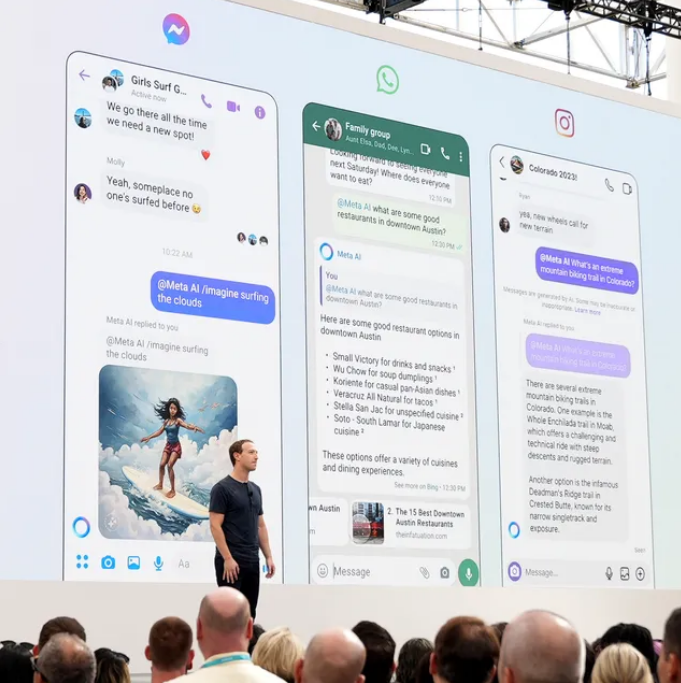
In the rapidly evolving world of artificial intelligence, the social media giant Meta has unveiled its latest innovation: the Meta AI Chatbot. This AI-powered wonder promises to revolutionize the way we interact online, blurring the lines between human connection and digital assistance.
For anyone who has used OpenAI’s ChatGPT, or other chatbots like Google’s Gemini ai, Anthropic’s Claude ai, Meta’s AI will immediately feel familiar but with billions of daily users across its messaging apps, Meta AI seems to have a key competitive edge against ChatGPT and others. The Meta AI chatbot is right there inside of your chat context. Hence, you don’t have to pull yourself out of context to interact or engage or get more things done.
Imagine a world where you never have to worry about running out of things to say, where brainstorming sessions happen at the speed of light, and where crafting the perfect caption becomes as effortless as breathing. That’s the promise of the Meta AI Chatbot, and it’s got everyone buzzing.
What is Meta AI Chatbot
Built on Meta Llama 3, Meta AI is an intelligent assistant, developed by Meta Platforms Inc. (formerly known as Facebook, Inc.) that is capable of complex reasoning, following instructions, visualizing ideas, and solving nuanced problems.
Meta AI chatbot assists and converse with users in a helpful and engaging way. You can interact with it like a person, to get things done, learn, create and connect with the things that matter to you.
Meta sees it as a free virtual assistant which can be used to do everything from research, planning a trip with your group chat, writing a photo caption, answering questions you’d normally ask a search engine and more.
In addition to answering questions, Meta AI can create AI-generated images like Midjourney or OpenAI’s DALL-E. Using the prompt “imagine,” users can ask Meta to produce any image that comes to mind.

Meta AI Capabilities
The Meta AI Chatbot boasts an impressive array of features and capabilities which include:
- Answering questions on various topics, from science and history to entertainment and culture.
- Generating text, such as articles, emails, or even creative writing.
- Offering suggestions and ideas for creative projects or brainstorming sessions.
- Providing definitions and explanations for complex terms and concepts.
- Conversing on various topics, using natural language understanding and generation capabilities.
Benefits of Meta AI Chatbot
Here are 9 benefits of Meta AI chatbot:
- 24/7 Availability: It’s always ready to assist, anytime, anywhere.
- Quick Answers: Get instant responses to your questions, saving you time and effort.
- Personalized Experience: It adapts to your preferences and communication style.
- Multi-Tasking: Handle multiple conversations and tasks simultaneously.
- Consistency: Provides accurate and consistent information, reducing human error.
- Scalability: Support a large volume of conversations, making it ideal for businesses.
- Cost-Effective: Reduce customer support costs and improve efficiency.
- Language Understanding: Comprehend natural language, making interactions feel natural.
- Continuous Learning: Improve knowledge and abilities through machine learning and user interactions.
These benefits make meta ai chatbot an excellent tool for various tasks, from customer support to creative writing and research assistance!
Meta AI Chatbot Applications and Use Cases
The Meta AI Chatbot has far-reaching potential across various industries and applications, including:
- Customer Service and Support: The chatbot can provide 24/7 customer support, answering frequently asked questions, and helping with basic inquiries.
- Virtual Assistants and Automation: The chatbot can be integrated into virtual assistants, such as Alexa or Google Home, to enhance their conversational capabilities.
- Language Learning and Education: The chatbot can engage in language learning conversations, helping students practice their language skills and receive feedback.
- Healthcare and Medical Applications: The chatbot can assist with patient inquiries, provide basic medical information, and help with appointment scheduling.
- Marketing and Sales: The chatbot can engage with customers, answer product questions, and help with lead generation.
How Meta AI Chatbot Works?
With Meta AI at your fingertips, you can research topics, explore interests, get how-to advice, and learn new hobbies. Leading search providers have been integrated so you can get up-to-date information from the web. Now, you can also ask Meta AI anything with search across Facebook, Instagram, WhatsApp and Messenger.
You can bring @MetaAI into your group chats in Messenger, Instagram, and WhatsApp to share recommendations for how to organize a group project or inspire ideas for dinner party recipes or a trip itinerary.
You can use Meta AI directly in your Facebook Feed to explore more on topics you and your loved ones engage with. When Meta AI is activated, you can get help connecting more deeply with content that matters.
How To Access Meta AI Chatbot
Users of Facebook, Instagram, WhatsApp and Messenger will be able to access Meta’s next-level generative AI assistant direct in the search bar of each app, across multiple countries.
As you can see in this example, posted by Instagram chief Adam Mosseri, now, when you go to search in any of Meta’s main apps (i.e. not Threads as yet), you’ll have access to Meta’s generative AI chat engine, where you’ll be able to pose conversational queries, directly in the app.
Meta AI is already available on the Ray-Ban smart glasses, and the company said that soon it will be available on the Meta Quest headset, too.
Additionally, the company has unveiled meta ai chatbot website for users to access the chatbot when trying to get things done on their computer.
Meta AI Chatbot Login Link
The meta ai site can be accessed via https://www.meta.ai
You will be required to login with Facebook to save your conversations with Meta AI for future reference.
Download Meta AI Chatbot?
For now, there is no meta ai chatbot app to download.
All you need to do is to update you existing Facebook app, Instagram app, Whatsapp app and Messenger app to have access to the meta ai chatbot feature in those apps.
Meta AI Chatbot Challenges and Limitations
While the Meta AI Chatbot is a remarkable achievement, it’s important to acknowledge its challenges and limitations:
- Data Quality and Bias: The chatbot’s performance is dependent on the quality and diversity of its training data, which can be biased or incomplete.
- Ethical Considerations and Privacy: The chatbot’s ability to collect and process user data raises ethical concerns and privacy issues.
- Technical Limitations and Errors: The chatbot can make mistakes or struggle with complex conversations, highlighting the need for ongoing development and improvement.
- Dependence on Technology: The chatbot’s reliance on technology can lead to dependence and decreased human interaction skills.
Conclusion
The Meta AI Chatbot is an exciting new step in the world of AI-powered communication. It has the potential to be an invaluable tool, boosting our efficiency and creativity. However, with any new technology, there are inherent challenges to address.
The future of AI chatbots is in our hands – as users, developers, and policymakers. It’s up to us to ensure that these digital companions enhance our lives rather than control them. Let’s embrace the possibilities while keeping a watchful eye on potential pitfalls.
Meta AI Chatbot FAQS
What does Meta AI do?
Meta AI chatbot can be used to ask questions, generate and animate images. It can also help you get more info about posts that appear in your Facebook feed.
Is Meta AI chatbot free to use?
Yes, Meta AI chatbot is free to use. According to Mark Zuckerberg, the goal is for Meta AI to be “the most intelligent AI assistant that people can freely use across the world”.
How do I get Meta AI on Whatsapp?
Update your Whatsapp app to the latest version and you should see the colourful meta ai round icon beside or at the of the “new chat” icon. You should also notice it in the Whatsapp search bar. Thereafter, you can proceed to ask whatsapp meta ai chatbot any question.
How do I get Meta AI on Messenger?
Update your Facebook Messenger app to the latest version and you should see the meta ai icon as one of the tabs at the bottom of the messenger app. You can also access it via the search bar in messenger.
How do I get Meta AI on Instagram?
Update your Instagram app to the latest version, tap the instagram search icon and you should see the colourful meta ai icon in the search bar. You can also access it when you try to create a new chat/message in the instagram app. You can use Instagram Meta AI chatbot to get advice or ask questions.
Leave a Reply