
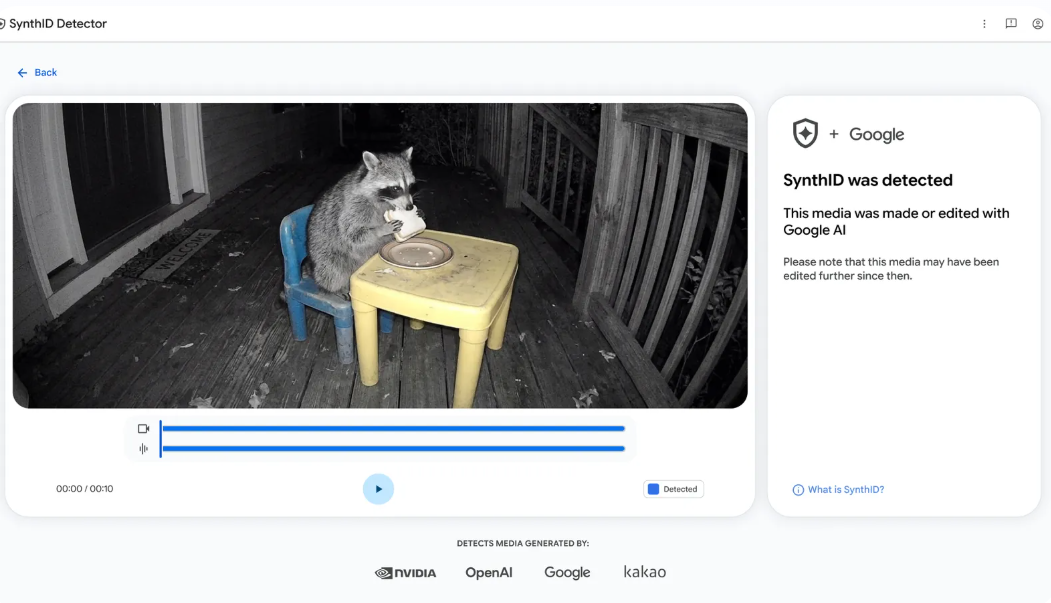
Wondering whether an image, video or audio clip was generated using artificial intelligence (AI)? You can now make use of the Google SynthID detector.
The Google SynthID detection tool simply helps you check digital media for invisible SynthID watermarks associated with AI-generated content. It supports content created using Google’s AI tools and compatible content from participating partners, including OpenAI, NVIDIA and Kakao.
If you are looking for a Google SynthID detector portal, an AI image checker or a way to check whether a video or audio clip was generated using AI, here’s what you need to know.
What Is Google SynthID Detector?
Google SynthID Detector is an online media verification tool developed by Google DeepMind. It is designed to identify SynthID watermarks embedded in supported AI-generated content.
SynthID is Google’s technology for embedding digital watermarks into AI-generated media. These watermarks are designed to be imperceptible to people while remaining detectable by compatible verification systems.
Unlike a visible watermark containing a logo or text, a SynthID watermark is embedded into the media itself. This means you generally cannot identify it simply by looking at an image or listening to an audio recording.
The detector helps users check for these watermarks in images, videos and audio files. Depending on the result, it may also highlight portions of the media where SynthID is detected.
Official portal: https://synthid.com/
Google SynthID Detector Portal: What Can It Check?
The Google SynthID Detector portal supports three main types of media.
1. AI-Generated Images
You can upload an image to check whether it contains a detectable SynthID watermark.
This makes the tool useful when you want to investigate an image shared on social media, received through a messaging app or found on a website.
For example, if someone shares a realistic-looking image and claims it is an actual photograph, you can use the SynthID detector to check whether the image contains a supported AI watermark.
The tool is particularly relevant to images generated using compatible AI tools, including Google’s image-generation technology.
2. AI-Generated Videos
The detector can also check supported video files for SynthID watermarks.
This may help when verifying videos circulating online, especially when a clip appears to show a public figure, an unusual event or a scene that is difficult to verify independently.
A video may contain a SynthID watermark in some portions rather than throughout the entire clip. Therefore, pay attention to the detector’s findings instead of assuming that every frame has the same result.
3. AI-Generated Audio
Google SynthID Detector can check supported audio files for detectable SynthID watermarks.
This can be useful when investigating AI-generated music, synthetic audio clips and other recordings created using compatible AI tools.
For instance, you might want to check whether an audio clip contains a watermark associated with AI-generated audio rather than relying solely on how realistic the voice or sound appears.
How to Use Google SynthID Detector as an AI Image Checker
Using Google SynthID detector as an AI image checker involves uploading your media to the official verification portal and examining the result.
Follow these steps:
- Visit the official website: Open https://synthid.com/ in your web browser.
- Choose your media file: Select the image, video or audio file you want to check.
- Upload the file: Follow the instructions displayed on the website to submit your media for verification.
- Wait for the analysis: Allow the detector to examine the uploaded file for compatible SynthID watermarks.
- Review the result.

The precise interface and available options may change as Google updates the service, so follow the instructions shown on the official website.
If you are checking an image, use the original image file when possible rather than a screenshot or a heavily edited copy. This helps you avoid introducing unnecessary changes before verification.
Is This AI? How to Check if an Image, Video or Audio Was AI-Generated
If you have ever looked at a realistic-looking picture, video or audio clip and wondered, “Is this AI?”, Google SynthID Detector can help you investigate.
Visit the Google SynthID Detector portal and upload a supported media file to check for detectable SynthID watermarks. The tool can help you identify supported AI-generated content in images, videos and audio.
However, it does not identify every type of AI-generated media. If no SynthID watermark is detected, that does not necessarily mean the content was created by a human. You may need to use other verification methods to investigate further.
If you’re interested in how AI-generated images are created, check out our guide to the best apps that generate images, featuring tools you can use to generate images with artificial intelligence.
Which AI Tools Does Google SynthID Detector Support?
Google says its detector can check supported media created using Google’s AI tools and participating partners.
These include Google AI products and compatible content from OpenAI, NVIDIA and Kakao. Google has also announced plans for Apple to join the partnership.
Google’s generative AI tools that use SynthID include technologies associated with image, video and audio generation. Examples include Nano Banana, Veo and Lyria, as well as generation features in products such as Gemini, Flow, ProducerAI and Vids.
However, support depends on the content and the watermarking technology used. Do not assume that every file created with every version of a particular product will necessarily produce a detectable result.
For the latest information about the technology, visit Google DeepMind’s SynthID page.
Google SynthID Detector vs Other AI Picture Detectors
Google SynthID Detector is not the only way to investigate whether media was created using AI. Other verification tools and services use different approaches.
Google SynthID Detector
Google’s detector searches for compatible SynthID watermarks embedded in supported media. Its advantage is that it can look for a specific signal associated with participating AI systems.
Hive AI Detector
Hive offers AI-detection tools designed to help identify AI-generated content. Its capabilities and supported media may differ from Google’s watermark-based approach.
You can explore Hive’s tools through its official website.
Other Image Verification Methods
You can also use reverse image search, inspect image metadata and look for reliable information about where a picture originally appeared.
These methods can provide useful context, although none should be treated as a guaranteed way to determine whether every image is AI-generated.
Which should you use? If you want to check for a SynthID watermark, start with Google SynthID Detector. If the image does not contain a detectable watermark, consider other verification methods rather than assuming the image is authentic.
Limitations of Google SynthID Detector
Although Google SynthID Detector can help verify media, it is important to understand its limitations.
- It does not detect every AI-generated file. The tool looks for compatible SynthID watermarks, not every possible AI signature.
- A negative result does not prove human creation. A file without a detected watermark could still have been generated by AI.
- It is not a general AI text checker. The public portal focuses on images, videos and audio.
- Results require context. A watermark can provide evidence about a file’s origin, but it does not automatically establish whether the content is truthful, misleading or authentic in every other respect.
- File changes can affect detection. Although SynthID is designed to remain detectable after many common transformations, detection is not guaranteed in every circumstance.
For sensitive situations, such as checking evidence of a serious event or investigating a potentially misleading video, combine the tool’s findings with independent verification.
Final Thoughts On Google SynthID Detector
Google SynthID Detector provides a convenient way to check images, videos and audio for invisible watermarks associated with supported AI-generated content.
Whether you are a content creator, journalist, researcher or simply someone who wants to investigate media shared online, the tool can help you gather additional information about where a file may have come from.
However, remember that detecting a SynthID watermark is not the same as detecting every form of AI-generated content. If the detector does not find a watermark, use other verification methods before concluding that the media is genuine.
You can try the tool directly at synthid.com.
Frequently Asked Questions (FAQs)
Is Google SynthID Detector a free AI image checker?
Yes. The Google SynthID detector is publicly accessible. Visit the official portal to check its current access requirements and any usage restrictions.
Can Google SynthID Detector identify AI-generated videos?
Yes. The public detector supports compatible video files and can check them for SynthID watermarks. Depending on the result, it may identify portions of a video where a watermark is detected.
Can Google SynthID Detector check audio files?
Yes. You can submit supported audio files to check for detectable SynthID watermarks associated with compatible AI-generated audio.
Is Google SynthID Detector also an AI Text Checker?
The public Google SynthID Detector portal discussed in this article is intended for checking images, videos and audio. It is not a general-purpose AI text detector for determining whether an essay, article or social media post was written by ChatGPT or another language model.
Does Google SynthID Detector work with ChatGPT images?
Google says the detector supports compatible media from participating partners, including OpenAI. However, detection depends on whether the particular image contains a compatible, detectable SynthID watermark. A result is not guaranteed for every ChatGPT image.
What is the difference between Google SynthID Detector and Hive AI Detector?
Google SynthID Detector looks for compatible SynthID watermarks, while Hive offers AI-detection tools that use different approaches. Their capabilities and supported formats may differ, so the appropriate choice depends on what you want to verify.
Where Can I Learn How to Remove SynthID from an Image?
SynthID is designed to embed an invisible watermark into AI-generated media, making it different from a visible watermark that can simply be cropped out. Whether a SynthID watermark can be affected by editing or transforming an image depends on the watermarking method and the changes made to the file.
If your goal is to understand how SynthID works and how image editing may affect watermark detection, consult Google’s official SynthID information. Keep in mind that altering an image does not guarantee that its SynthID watermark will be removed or become undetectable.